
Activity Association
Activity Association sets the rules for how Outdoo AI links a recorded call to the correct account and deal in your CRM. This article explains each setting and how the tiebreakers work.
The page subtitle describes it as rules for linking a call to the correct deal, contact, or account in your CRM. You need a connected CRM first. See All CRMs.
Open the page
Go to Company Settings > CRM > Activity Association.
The settings save as soon as you change them. There is no Save button.
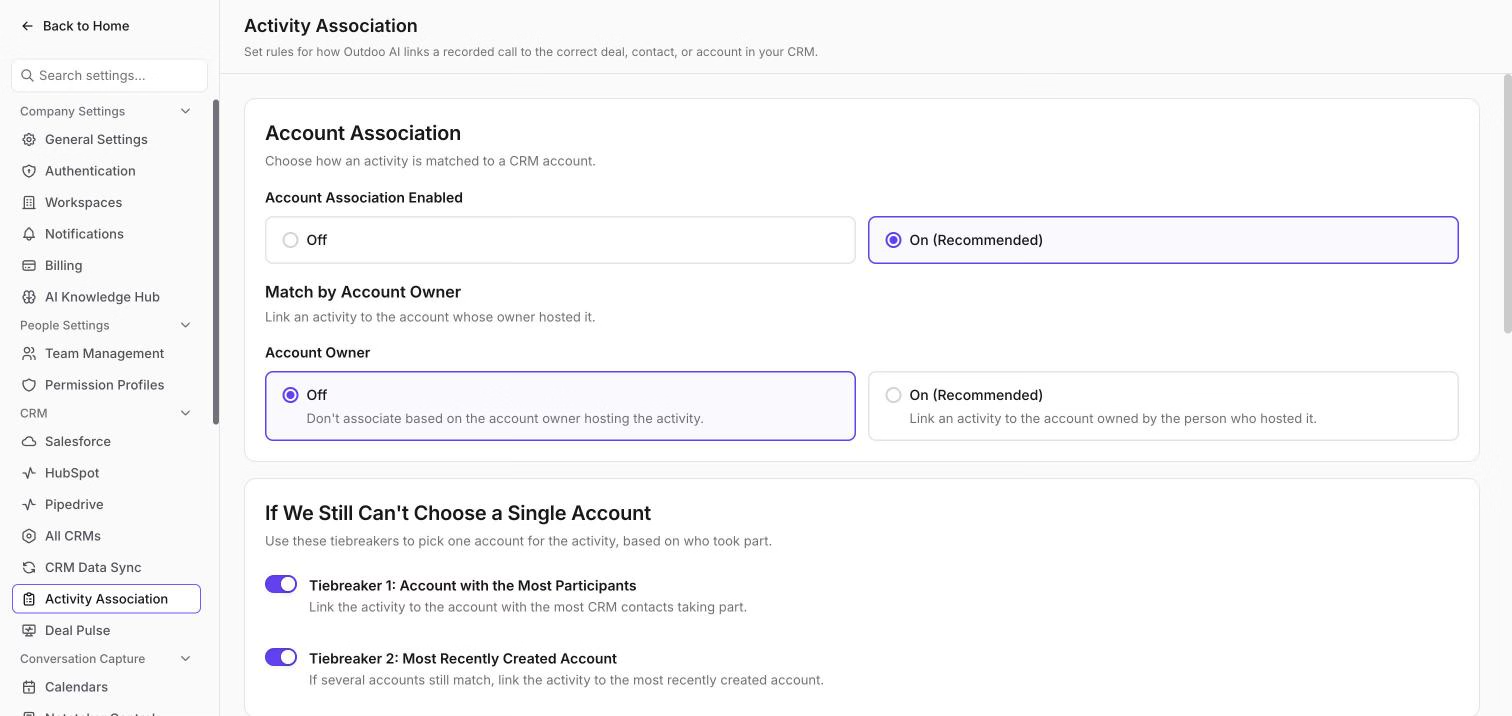
Account Association
This card is headed "Choose how an activity is matched to a CRM account."
- Account Association Enabled: choose Off or On (Recommended).
- Match by Account Owner: link an activity to the account whose owner hosted it. In the Account Owner options, Off means "Don't associate based on the account owner hosting the activity". On (Recommended) means "Link an activity to the account owned by the person who hosted it".
If We Still Can't Choose a Single Account
Sometimes more than one account still matches. These two switches decide which one wins:
- Tiebreaker 1: Account with the Most Participants: link the activity to the account with the most CRM contacts taking part.
- Tiebreaker 2: Most Recently Created Account: if several accounts still match, link the activity to the most recently created account.
Deal Association
This card is headed "Choose how an activity is matched to a CRM deal."
- Deal Association Enabled: choose Off or On (Recommended).
- Match by Activity Participants: narrow down deals by who took part in the activity. For example, if a deal owner joins a meeting, Outdoo AI links the meeting to that deal.
Under Match by Activity Participants there are three options. Each can be Off or On (Recommended):
- Deal Owner: with On, a deal is linked only if its owner took part in the activity. If the deal has no owner, the activity is not linked to any deal.
- Deal Contacts: with On, a deal is linked only if a deal contact took part. If the deal has no contacts, the activity is not linked to any deal.
- Team Members Working on the Deal: with On, a deal is linked only if a deal team member took part. If the deal has no team members, the activity is not linked to any deal.
If We Still Can't Choose a Single Deal
These two switches work the same way as the account tiebreakers:
- Tiebreaker 1: Deal with the Most Participants: link the activity to the deal with the most CRM contacts taking part.
- Tiebreaker 2: Most Recently Created Deal: if several deals still match, link the activity to the most recently created deal.
Tips
- Start with the recommended settings and change them only if calls are linking to the wrong account or deal.
- If a call is linked to the wrong deal, you can fix the link on the call itself. See Link a call to a deal.
- Other CRM settings, such as what syncs to your CRM, are in CRM Data Sync.
Hope this article was helpful. For any queries, please write to support@outdoo.ai