
Notetaker Not Joining All of the Meetings?
Discover why your Notetaker isn't joining all meetings and learn how to resolve common issues like skip terms, billing limits, and integration problems.
If your Notetaker is not joining all your meetings, there could be several reasons. This guide covers the most common causes and how to resolve them.
Common Reasons and Solutions
- Meetings Settings:
- Ensure the meetings are scheduled under the connected calendar or platform
- Verify that the meeting links are valid and accessible
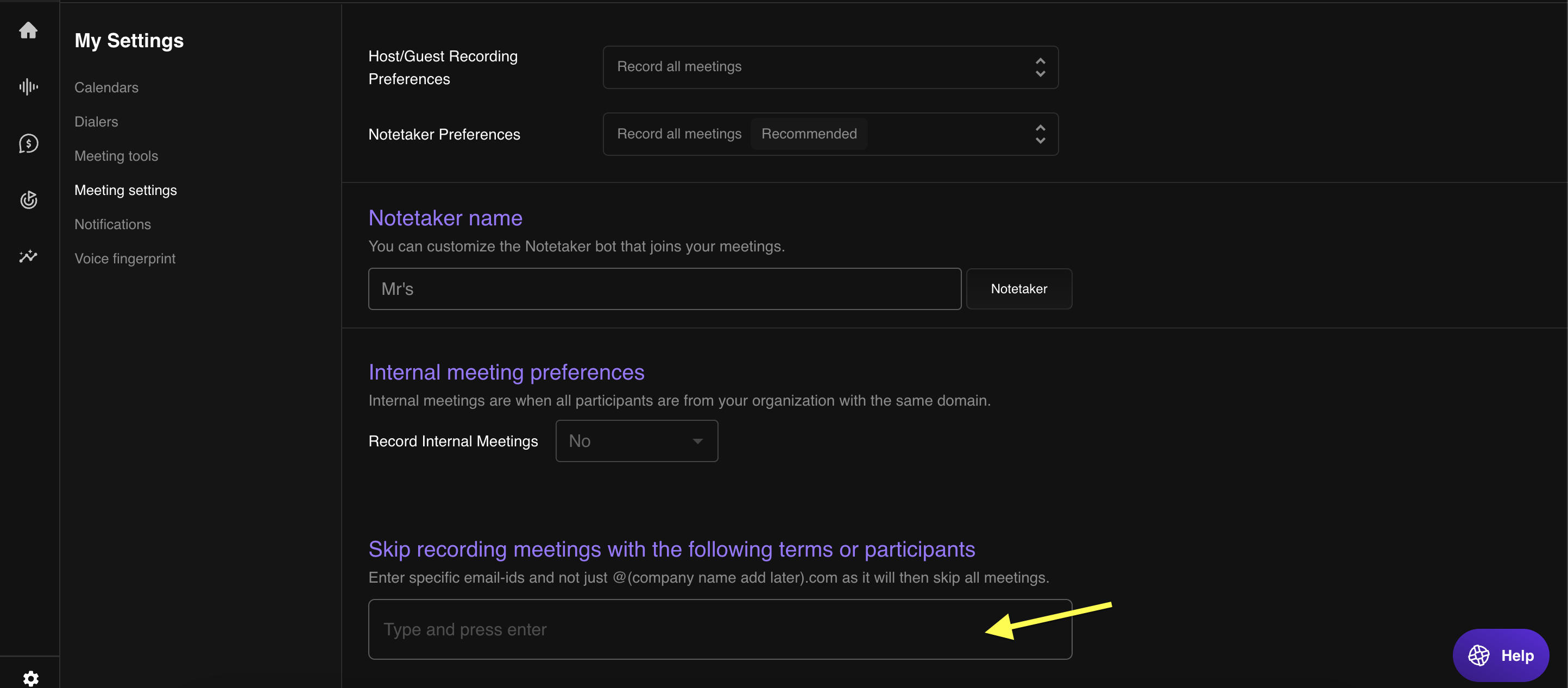
- Skip Terms Configuration:
- Check if the meeting title contains any terms listed under "Skip Terms" in settings
- Remove or adjust skip terms if they are unintentionally blocking important meetings
- Billing Quota Limitations:
- Verify if your account has reached the usage quota
- Upgrade your plan or free up quota by managing previous recordings
- Zoom Registration Issues:
- Confirm that Zoom is properly integrated with Outdoo AI
- Reauthorize the Zoom integration or check Zoom meeting settings that might restrict third-party apps
- Microsoft Teams Registration Issues:
- Ensure Microsoft Teams is correctly registered and integrated
- Re-register the integration and check Teams policies that could block bot participation
- Notetaker Joined but Failed or Was Not Allowed:
- Verify if the meeting host admitted the Notetaker when the waiting room is enabled. Disable waiting rooms for automated Notetaker entry or ensure the host is aware to admit the bot
- Check for settings that block external participants and adjust meeting settings to allow the Notetaker
Still Facing Issues?
If the Notetaker still is not joining after trying the above steps, reach out to our support team with the meeting details and error logs.
- Email: support@outdoo.ai
- Live Chat: available on our website