
Outdoo AI User Roles and Permissions Guide (AI Roleplay)
Learn about Outdoo AI's role-based access system and understand which permissions each user role has, from Admin to Viewer, to manage your team effectively.
Outdoo AI offers a flexible, role-based access system that helps teams collaborate effectively while ensuring sensitive features are accessible only to relevant stakeholders. Below is a breakdown of user roles, their permissions, and billing applicability.
Role Overview
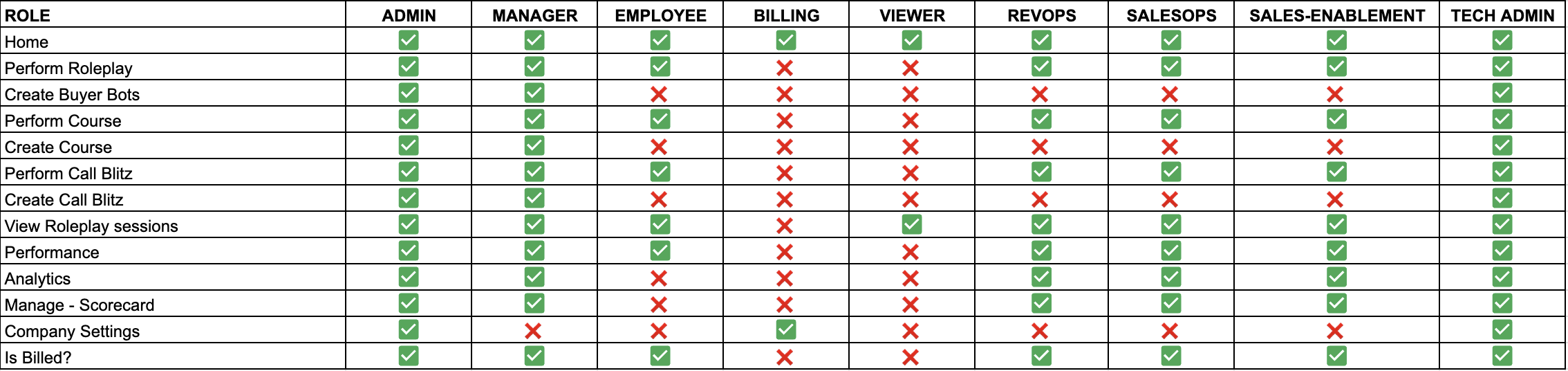
Quick Role Highlights
- Admin: Full access to all features and settings. Ideal for account owners and platform administrators.
- Manager: Broad access, including Analytics and Performance. Suited for team leads and department heads.
- Employee: Core access to Buyer Bots, Call Blitz, and Courses. No company-level visibility.
- Billing: Limited to account and billing-related functions. No access to Roleplay, Courses, or other features.
- Viewer: Read-only access for leadership or advisors. Good for oversight without billing or operational involvement.
- RevOps / SalesOps / Sales Enablement: Strategic operational roles with access to all business-critical features, excluding company settings.
- Tech Admin: Full access to all features and settings. Best suited for managing platform-level integrations and IT controls.
Add new members manually to assign appropriate roles and permissions based on their responsibilities.