
Can We Customise the Summary Format?
Learn how to customize meeting summary formats using Playbooks, Outdoo AI's workaround feature for creating tailored AI-generated documents that match your specific needs.
Outdoo AI does not currently support direct customization of the summary format. However, you can use the Playbooks feature to create custom AI-generated documents tailored to your specific use cases.
How to Use Playbooks as a Workaround
- Access Playbooks:
- Navigate to Company Settings within the Outdoo AI dashboard
- Locate Playbooks under the Analysis card
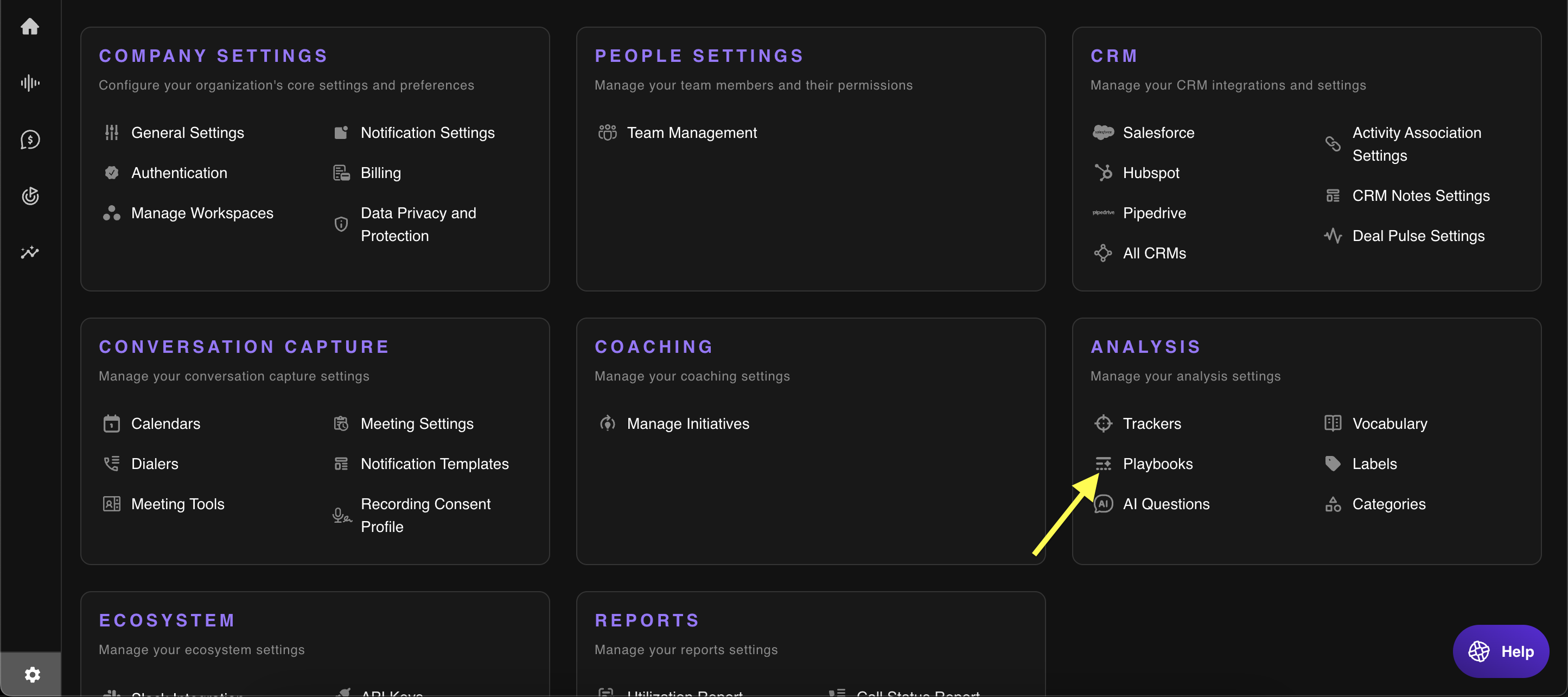
- Create a New Playbook:
- Click "Add a template" to start creating a new Playbook
- Define Custom AI Document Structure:
- Use the editor to outline the structure and content you need
- You can apply the Playbook to meetings or deals and link it to your CRM if necessary
- Add Template for Desired Content:
- Provide clear instructions to guide the AI in generating content that meets your format preferences
- Example prompt: "What is the budget or financial resources available to the customer for investing in a solution?"
- Save and Activate:
- Save your Playbook after finalizing the structure and prompts
- Once activated, it will automatically generate customized AI documents after each meeting
Here is a walkthrough video for your convenience.
Benefits of Using Playbooks
- Customizable: tailor summaries to reflect your preferred format and structure
- Automated: streamline the generation of structured meeting notes
- Consistent: maintain uniformity across all customer-facing interactions
Example Use Cases
- Sales Calls: generate summaries highlighting next steps and objections
- Customer Success Meetings: document action items with deadlines and assigned owners
- Product Feedback Sessions: organize feedback into clear categories