
Create a Micro-Learning Roleplay Agent
A micro-learning agent focuses on one section of a conversation instead of running through an entire call flow, like a discovery call that can last 20 to 40 minutes. Use it to train on pitch delivery, handling objections, or pricing and negotiation without the rest of the conversation getting in the way.
Here is how to create one in Outdoo.
Watch: How to Create a Micro Learning Roleplay Agent (Train Specific Skills)
1. Start with a prompt
Prepare a scenario for your agent. For example: a roleplay agent that simulates a real estate manager at a warehousing company looking to lease multiple properties in Texas for business expansion.
Then define the conversation type, for example Cold Call.
2. Select Micro-Learning mode
When setting up your agent, choose Micro-Learning instead of Full Conversation. Since you selected Cold Call, the system shows sub-sections related to that conversation type.
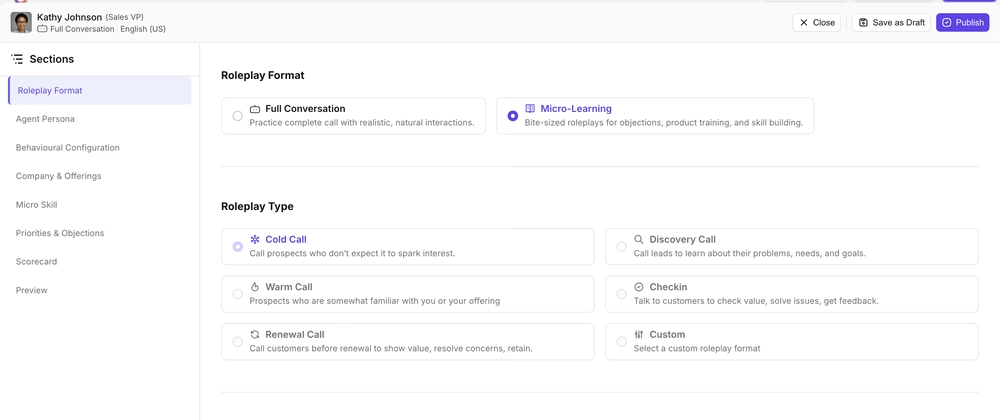 Choose Micro-Learning instead of Full Conversation, then pick a Roleplay Type.
3. Choose a sub-section
Pick the specific part of the conversation you want to train on. Options include:
- Objection handling
- Negotiations
- Pricing discussions
For example: Negotiation > Discount Negotiations.
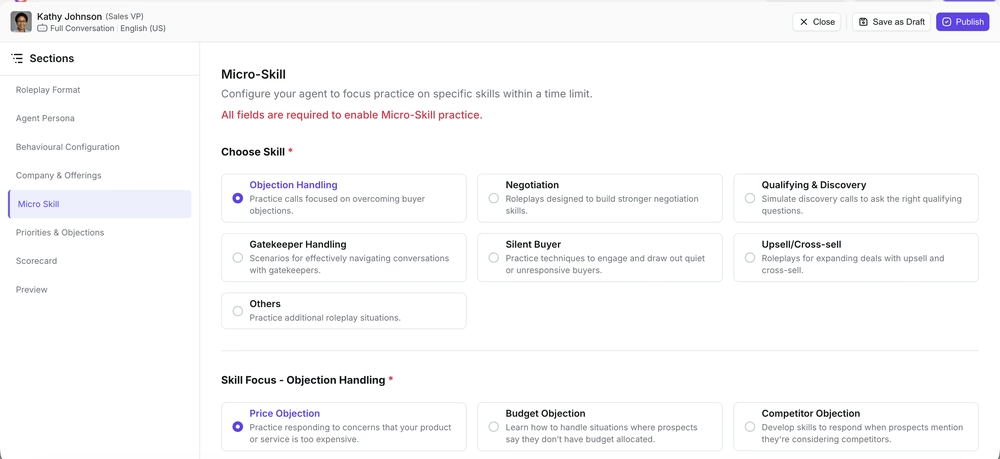 Choose a skill, then a specific focus area within it.
4. Set a time limit
Define how long the session should run, for example 10 minutes. Once the time is up, the agent automatically closes the session. Micro-learning works best when the training stays short and focused.
5. Review the agent profile and configuration
The agent auto-generates a buyer profile, company offering, and priorities and objectives. Verify these details and adjust anything that does not fit your scenario.
6. Add a scorecard (optional)
Create or select a scorecard specific to the section you are training on, for example one tailored to pricing and negotiation.
7. Publish your agent
Once everything is configured, click Create. Your micro-learning agent is ready to use.
Related articles
- Intro to Roleplay Agents
- Creating roleplay agents, overview
- Creating a scorecard for the roleplay buyer bot