
How to Earn Course Certifications: Step-by-Step Guide
Learn how to enroll in courses, complete requirements, and earn certifications automatically. Discover how to access, download, and share your certificates with others.
Step 1: Enroll in a course
- Navigate to the Courses section in your platform
- Browse available courses related to your role or interests
- Click on a course that interests you
- Select Enroll to join the course
Step 2: Complete course content
- Access the course modules and lessons
- Work through all required content sections
- Complete any quizzes or assessments specified by the course
- Meet any minimum score requirements, typically shown in the course details
Step 3: Automatic certification
- Your certificate is generated and awarded automatically upon successful course completion
- You will receive a notification confirming your certification
- No manual submission or approval process is required
Step 4: Access your certificate
- Go to Certificates & Accomplishments in your profile
- Locate the course certification you just earned
- Click on the certificate to view details
- The certificate displays your name, the course name and completion date, a unique verification ID, and your organization's branding
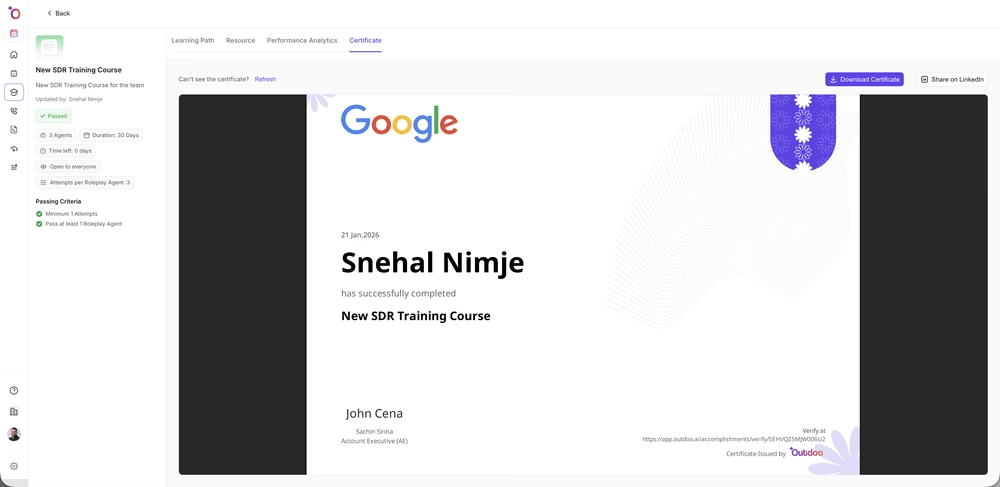 The Certificate tab on a completed course, with options to download or share on LinkedIn.
Step 5: Download your certificate
- In the certificate view, select the Download button
- Choose your preferred format (PDF is recommended for sharing)
- Save the file to your device
Step 6: Share your achievement
- In the certificate details, look for the Share option
- Select Generate Verification Link to create a shareable URL
- Copy the link and share it by email to colleagues or managers, on professional social media, in your resume or portfolio, or by direct message to team members
- Others can use this link to verify your certification independently
Accessing your certificates and accomplishments
View all your certifications
- Navigate to your Profile
- Select Certificates & Accomplishments
- Browse your complete collection of earned certifications
- Use filters to sort by date, course category, or status
What you will see
- Certificate name and course title
- Date earned
- Organization badge
- Completion status
- Quick action buttons (Download, Share, View Details)
Tips for making the most of your certifications
- Prioritize courses that align with your current role and career goals, mixing foundational and advanced certifications for broader skill coverage.
- Review your Certificates & Accomplishments section regularly and share recent achievements with your manager during one-on-ones.
- Add shareable links to your email signature or LinkedIn profile, and send them to managers or recruiters who need to verify your credentials.
- Certifications matter most when paired with demonstrated on-the-job application, so share how you applied what you learned in your daily work.
- Use your certification history to spot skill gaps and enroll in related courses to build deeper expertise.