
Can You Announce That the Meeting Is Recorded?
Learn how to notify meeting participants that their call is being recorded using pre-call emails or automated audio prompts in Outdoo AI.
Yes. Outdoo AI provides options to notify participants that a meeting is being recorded. You can set up these notifications under Company Settings to ensure transparency.
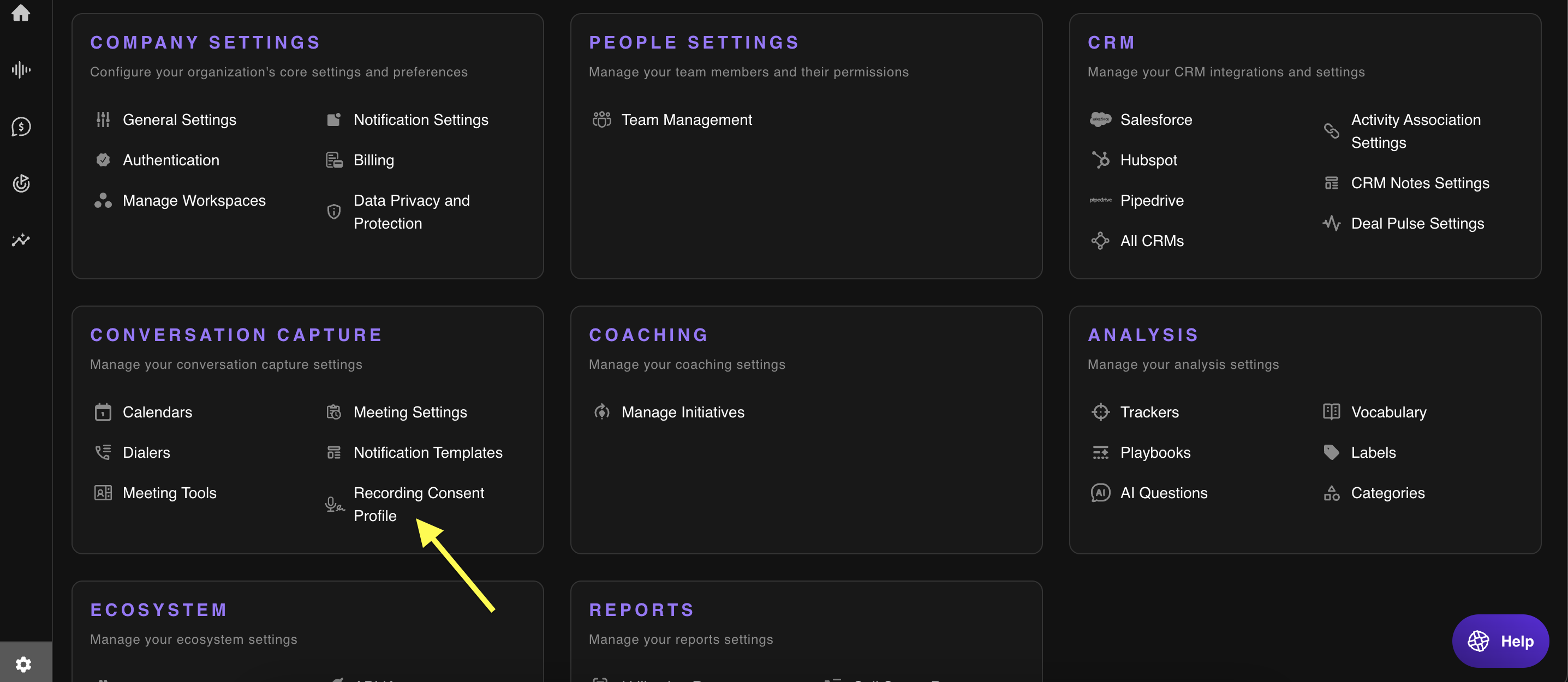
Steps to Configure Recording Consent Notifications
- Navigate to Company Settings
- Click on Conversation Capture to manage recording settings
- Under the Recording Consent profile section, click Add Profile to create a new consent notification method
Available Consent Notification Options
Outdoo AI offers two primary methods to inform participants:
1. Pre-Call Email Notification
- Participants receive an email reminder 10 minutes before the scheduled call, notifying them that the meeting will be recorded
- How to enable: In the Recording Consent profile, select Pre-call email. Customize the email template if needed. Save changes to activate the notification
2. Audio Prompt at Meeting Start
- An automated audio message announces the recording at the beginning of the call
- How to enable: In the Recording Consent profile, select Audio Prompt. Choose your preferred audio prompt from the provided options or upload a custom recording. Save changes to implement the feature