
Clone and Reuse Roleplay Agents for the Sales Cycle
Learn how to clone roleplay agents across different sales stages while maintaining consistent buyer personas. Adapt objections, interests, and coaching instructions for Discovery, Pricing, Demo, Qualification, and Negotiation stages.
Watch: How to Clone a Roleplay Agent (Customize in Minutes)
When to use this method
This method works well for:
- Maintaining the same buyer across multiple stages
- Training reps on multi-stage selling
- Teaching pattern recognition and objection evolution
- Scenario-based certifications
Steps to clone and adapt a roleplay agent
Step 1: Open an existing agent
Choose your perfected persona.
Step 2: Click the three-dot menu
Select Roleplay Type.
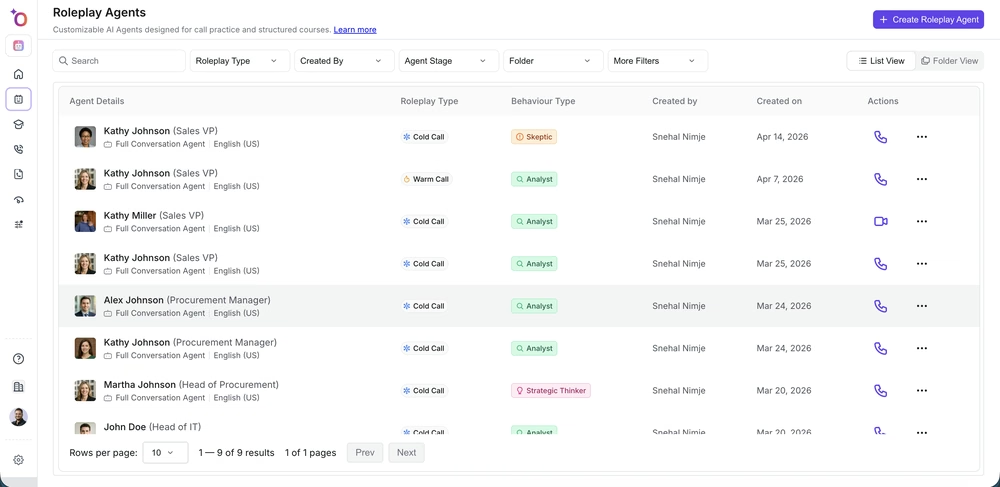 The three-dot menu in the Actions column, where Roleplay Type lives.
Step 3: Choose the new sales stage
Options include Discovery, Pricing, Demo, Qualification, Negotiation, and custom stages.
Step 4: Update key settings
Refine the persona details, objections, interests, preferences, and scorecard criteria.
Step 5: Add coaching instructions
Guide the learner based on the new stage.
Step 6: Save and share
Your updated agent is ready for Courses, Loops, and Blitz sessions.