
AI Knowledge Hub
The AI Knowledge Hub is where you train and configure the AI model that powers your roleplays, coaching feedback, and customer-facing simulations. It learns your company, your products, your personas, and your competitors, so the responses it generates reflect your actual business rather than generic answers.
Top use cases for AI Knowledge Hub
- Sales training and roleplay simulations: train the AI to act as a realistic prospect or customer based on personas, objections, and competitor information, so reps can practice handling tough questions in a safe environment.
- Coaching and feedback for reps: configure the AI with your offerings, Q&A, and stories so it can give reps instant, context-aware feedback that reinforces your team's messaging.
- Onboarding new team members: new hires interact with an AI trained on your product details, customer stories, and objection handling, which speeds up ramp time compared to static materials alone.
- Customer-facing knowledge support: equip AI assistants with structured company, product, and competitor information so customers and prospects get accurate, on-brand answers in real time.
- Competitive readiness and positioning: train the AI with competitor data so reps can practice positioning your product against alternatives and build confidence in competitive conversations.
- Persona-based messaging practice: define personas so reps can tailor pitches for CFOs, end users, or other decision-makers. The AI adjusts tone, objections, and value focus based on the persona.
- Case-study-driven storytelling: the AI learns customer success stories and weaves them into practice conversations and coaching, helping reps sound more credible in live calls.
- Continuous improvement: as your offerings, messaging, or competitors change, update the AI Knowledge Hub so reps always train against current content.
How to create an AI Knowledge Hub
1. Access the AI Knowledge Hub section
Go to Company Settings > Company > AI Knowledge Hub. You land on the "About Company" tab by default. This is where you provide the information the model needs to learn about your business before any further configuration.
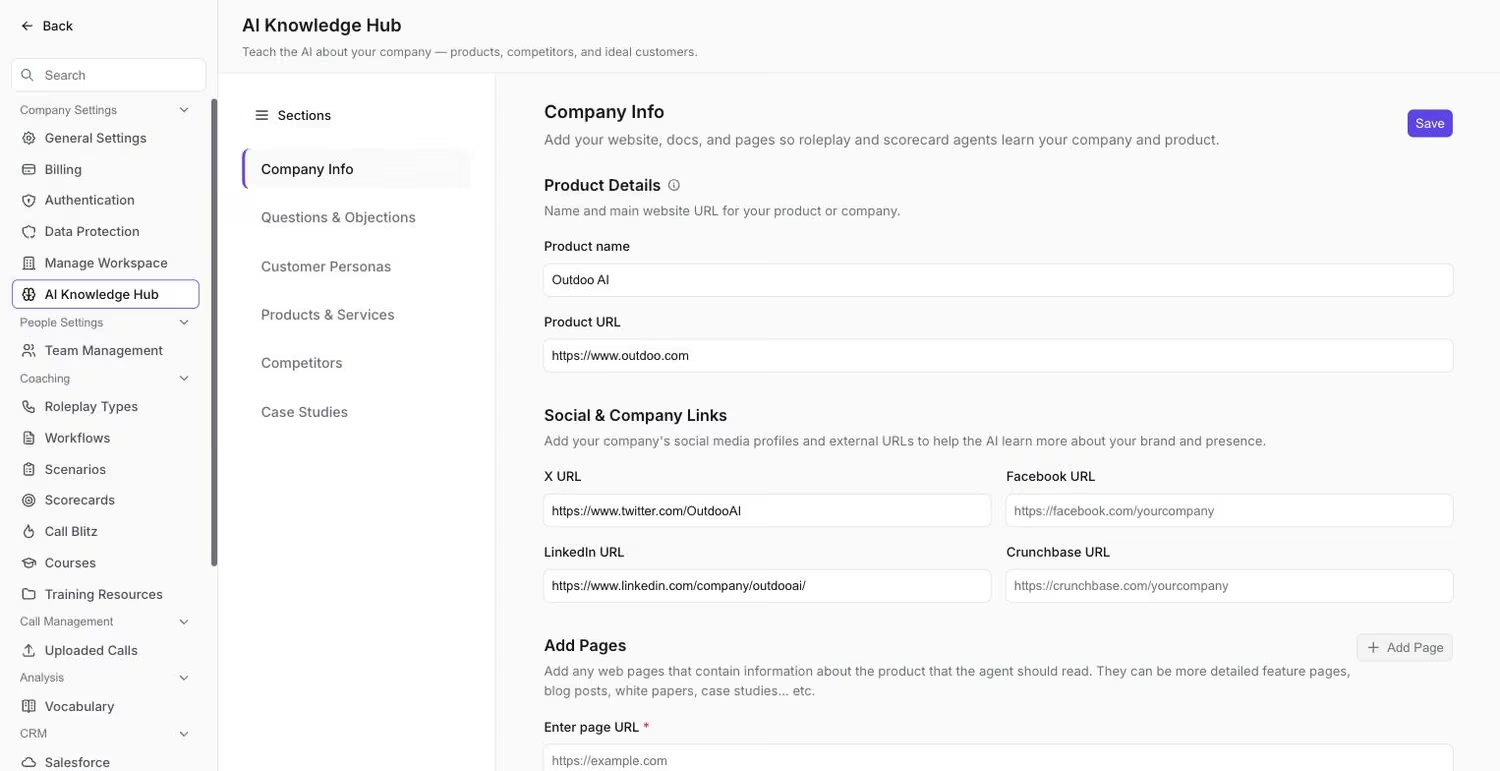 The Company Info tab, where product name, URL, and web pages for training are entered.
2. Set up basic product information
Enter your product name, main product URL, and, optionally, your social media profiles. This gives the AI the basic context it needs to represent your company accurately in coaching simulations, roleplays, and customer-facing interactions.
- Enter your product name (required)
- Add your main product URL (required)
- Include social media profiles (optional but recommended)
3. Add training content
- Click "Add" to add web pages for AI training.
- Enter a descriptive page name.
- Provide the full URL.
- You can add up to 15 pages.
4. Configure questions and objections
Configuring Q&A pairs trains the AI to mirror how your team handles common customer questions, concerns, and objections, whether that means clarifying product features, addressing pricing, or working through hesitation. This keeps messaging consistent across coaching simulations, roleplays, and customer-facing interactions.
- Switch to the "Questions & Objections" tab.
- Click "Add Question" to create Q&A pairs.
- Enter common customer questions and your preferred answers.
- Save each Q&A pair.
5. Define customer personas
Personas give the model a structured view of who your customers are, what they care about, and how they make decisions. This helps the AI personalize conversations, anticipate objections, and align solutions with customer needs.
- Navigate to the "Personas" tab.
- Click "Add New Persona".
- Fill in persona details: name and priority level, value proposition, common struggles, and time spent on activities.
6. Set up product offerings
Structured information about your products, services, and differentiators helps the model represent your value proposition accurately in real-world scenarios.
- Go to the "Offerings" tab.
- Click "Add Offering".
- Define your products or services with their features and benefits.
- Add supporting quotes for each feature.
7. Add competitor information
Defining what sets your business apart, whether that's product capability, service quality, or market expertise, helps the model reinforce those differentiators consistently and respond accurately when a competitor comes up in conversation.
- Switch to the "Competitors" tab.
- Click "Add Competitor".
- Enter competitor details and product URLs.
8. Include customer stories and case studies
Documenting the problems customers faced, the solutions you provided, and the outcomes they achieved gives the model real examples to draw on. These stories give the AI authentic proof points to reference during coaching simulations, roleplays, or customer-facing scenarios.
- Navigate to the "Customer Stories" tab.
- Click "Add Story".
- Document customer success stories with problems, solutions, and outcomes.
How to edit an AI Knowledge Hub
- Access existing data: navigate to the relevant tab, find the item, click the edit icon or "Text" button, update the fields, and save. Real-time validation checks data quality as you go.
- Add new items: use the "Add" buttons and follow the same process as initial creation.
- Delete items: click the delete icon on any item and confirm deletion in the modal. Deleted items are permanently removed.
Best practices for AI Knowledge Hub
Content quality
- Use clear, descriptive names for page titles and offerings.
- Fill in all available fields so the AI has complete information to work from.
- Keep content current by updating it as your business changes.
- Use specific, concrete examples in Q&A pairs and stories rather than generic statements.
Training optimization
- Include diverse content sources: web pages, documents, and social media.
- Cover common questions and edge cases in your Q&A.
- Write detailed, specific customer personas rather than broad ones.
- Include full features and benefits for each offering.
Maintenance
- Review and update content monthly.
- Track AI response quality and adjust the content that feeds it.
- Collect user feedback on AI responses and use it to improve the source content.
Troubleshooting
URL validation errors
- Make sure URLs are complete and accessible.
- Check for typos in URLs.
- Verify URLs are publicly accessible.
Form validation errors
- Check that required fields are filled in.
- Make sure character limits are respected.
- Verify the data format matches what is expected.
Training delays
Training typically takes 5 to 10 minutes. Large file uploads or a high number of URLs can extend this. Contact support if training takes longer than 15 minutes.
Data not saving
- Check your internet connection.
- Verify all required fields are completed.
- Try refreshing the page and re-entering the data.
If you need help, contact us at support@outdoo.ai.