
Scorecard prioritization
Scorecard weightage controls how strongly a scorecard, or its individual criteria, applies to an evaluation. Scorecard priority controls which scorecard takes precedence when multiple scorecards could apply to the same call or roleplay.
Used together, these settings reduce "wrong scorecard" noise, keep reporting consistent across teams with different playbooks, and improve coaching signals by matching scoring to the actual scenario.
Why use it
- More accurate evaluations: fewer cases where the wrong scorecard is used for a call or roleplay.
- Cleaner reporting: teams using different playbooks can rely on the correct scorecard being applied automatically.
- Better coaching: scores and feedback align with the right scenario, so reps get relevant signals.
What has changed
Capability | Before | Now |
|---|---|---|
Scorecard weightage | Available in Roleplay for weighting criteria. | How strongly a scorecard applies for a call is clearer and more controllable. |
Scorecard priority | Previously only in Recorded Interactions (RI / Coaching). | You can now define which scorecard takes precedence when more than one could apply, for example in Roleplay and other flows. |
Important product details
- Weightage can apply at two levels: scorecard-level, meaning how strongly the scorecard is considered when multiple could fit (where supported), and question-level, meaning that when weighted scoring is enabled, each objective has a weight (for example 1-10) that affects its contribution to the overall score.
- Priority is an order (for example Top, Last, or Custom position). When the system must choose one scorecard among several that could apply, the one with higher priority wins.
- Weightage and priority behavior may vary by product area (Roleplay, Coaching / Recorded Interactions). The UI for priority is typically in Coaching > Scorecards (initiatives); weightage appears in both Roleplay and Coaching scorecard setup.
Scorecard weightage
What it is
Weightage controls how much influence a scorecard, or individual criteria, has on the evaluation.
- Weighted scorecards: when "Use weighted scoring" is on, each objective or question can have a weight (for example 1-10). Higher weight means that criterion counts more toward the overall score.
- Scorecard-level weightage: in contexts where multiple scorecards could apply, weightage can also express how strongly a given scorecard fits the call, so the system can prefer the best-matching one.
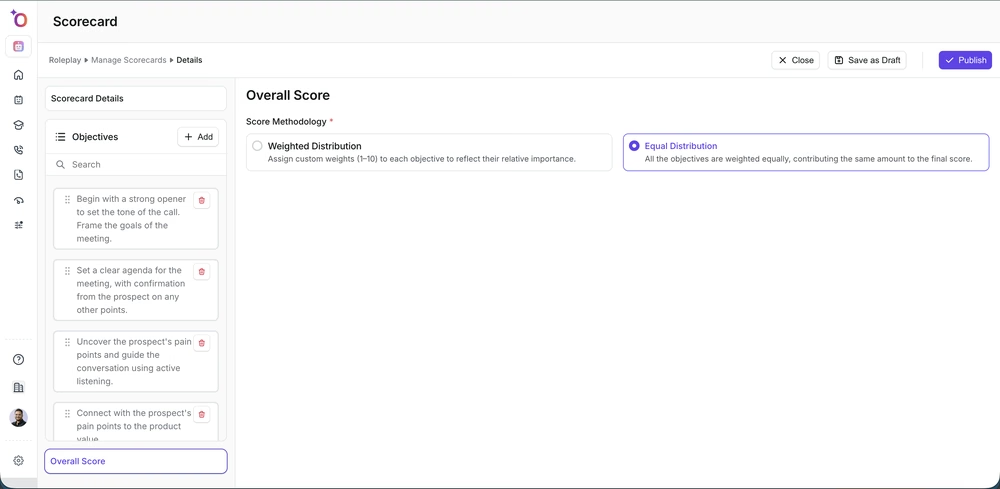 Weighted Distribution lets you assign a 1-10 weight per objective; Equal Distribution weighs them all the same.
Why it matters
- Fairer scores: important criteria (for example discovery questions, compliance) can count more than nice-to-haves.
- Better fit: when multiple scorecards are possible, weightage helps the system apply the one that best matches the call or roleplay.
Where to configure question-level weightage
- Go to Scorecards (under Roleplay or Coaching, depending on your product).
- Create a new scorecard or open an existing one.
- In Scorecard Details > Settings (or equivalent), enable weighted scoring.
- In the Overall Score / Objectives section, set a weightage (for example 1-10) for each objective.
- Save the scorecard.
Weightage is usually between 1 and 10 per objective. All objectives may need a valid weightage when weighted scoring is on (the product may show a validation error otherwise). Default weightage is often 5 if not set.
Best practices
- Give higher weight (for example 8-10) to must-have behaviors such as compliance and key discovery questions.
- Use medium weight (for example 4-6) for important but not critical criteria.
- Use lower weight (for example 1-3) for optional or nice-to-have criteria.
- Keep weight spreads meaningful; avoid giving every objective the same weight.
Scorecard priority
What it is
Scorecard priority defines the order in which scorecards are considered when more than one could apply to the same call or roleplay. The scorecard with higher priority (for example "Top" or the highest order number) is chosen.
Why it matters
- Predictable behavior: you control which playbook wins when a call could match several (for example discovery vs. negotiation).
- Cleaner reporting: the same call type consistently uses the same scorecard, so dashboards and trends are reliable.
- Less wrong-scorecard noise: managers see fewer cases where the applied scorecard does not match the scenario.
Where to configure priority (Coaching / RI)
- Go to Coaching > Scorecards (or Initiatives, depending on your product).
- Create a new scorecard or open an existing one.
- In Scorecard Details > Settings, find Order of the Scorecard (or Priority).
- Choose Top if the scorecard should be considered first, Last if it should be considered last, or Custom to set a specific order within the allowed range.
- Save the scorecard.
The allowed range depends on how many scorecards exist in your workspace. New scorecards often default to Top (order 1). When priority is expanded to Roleplay or other areas, the same logic applies.
How the system uses priority
- When a call or roleplay could be evaluated by multiple scorecards, the system compares their priority (order).
- The scorecard with the highest priority (for example order 1 or "Top") is applied.
- Ties may be resolved by product-specific rules such as creation date or ID; check in-app help or release notes for your environment.
Best practices
- Put default or most common playbooks at Top.
- Use Last or lower order for fallback or generic scorecards.
- Use Custom to slot a scorecard between others (for example Discovery at 1, Negotiation at 2, Generic at 3).
- After adding or removing scorecards, review the order so the right scorecard still wins for each scenario.
Use cases
Multiple playbooks per team
Different teams (for example SDR vs. AE) use different scorecards for the same call type. Priority ensures that when a call could match both, the correct playbook is applied based on configuration, not chance.
Roleplay with overlapping scorecards
Several roleplay agents could use different scorecards that might all be eligible for a given practice session. Priority (where supported) and weightage help the system choose the scorecard that best matches the roleplay design.
Recorded calls (RI / Coaching)
Recorded calls are matched to initiatives and scorecards by rules such as deal stage and conversation type. When more than one scorecard matches, priority determines which one is used for scoring and reporting.
Weighted objectives within one scorecard
If you want discovery and compliance to count more than small talk, weighted scoring with question-level weightage lets you assign higher weight to those objectives so the overall score reflects what matters most.
How-to guides
Enable weighted scoring and set objective weightage
- Go to Roleplay > Scorecards or Coaching > Scorecards (or Initiatives).
- Open a scorecard (or create one) and go to Scorecard Details.
- In Settings, enable Use weighted scoring (or the equivalent toggle).
- Open the Overall Score / Objectives section.
- For each objective, set weightage to a value between 1 and 10 (or the range your product supports).
- Make sure every objective has a valid weightage if required; fix any validation errors.
- Save the scorecard.
Set scorecard priority (Coaching / RI)
- Go to Coaching > Scorecards (or Initiatives).
- Open the scorecard you want to prioritize.
- In Scorecard Details > Settings, find Order of the Scorecard (or Priority).
- Select Top, Last, or Custom. For Custom, enter the desired order number within the shown range.
- Save. This order is used when multiple scorecards could apply to a call.
Choose which scorecard applies when multiple could fit
- List the scorecards that could apply to the call or roleplay type.
- Set priority so the intended scorecard has the highest priority (Top or order 1).
- Use weightage (where supported) so that the best-matching scorecard is weighted more strongly.
- After changes, run a test call or roleplay and confirm in conversation details that the expected scorecard was applied.
Fix a "wrong scorecard" applied to a call
- Open the conversation details for the call.
- Note which scorecard was applied and which one you expected.
- In Coaching > Scorecards, open both scorecards and compare their priority (order).
- Adjust priority so the desired scorecard has higher priority than the one that was applied.
- If your product supports scorecard-level weightage for matching, increase the weightage of the desired scorecard relative to others.
- Save and, if possible, re-run or re-evaluate the call to confirm the correct scorecard is now used.
How managers can use prioritization for reporting
- Filter by scorecard: in performance or coaching views, filter by the scorecard with top priority for a given scenario to see consistent metrics.
- Audit order: periodically review Order of the Scorecard for all initiatives so default and fallback scorecards match your team structure.
- Coach on the right criteria: use weighted scorecards so rep feedback emphasizes high-weight objectives and report on those dimensions.
Quick reference
- Scorecard weightage: question-level, weight 1-10 per objective when weighted scoring is on; scorecard-level, how strongly the scorecard applies when multiple could fit (where supported).
- Scorecard priority: order of the scorecard (Top / Last / Custom). Higher priority wins when multiple scorecards could apply.
- Where to set priority: Coaching > Scorecards (Initiatives) > Scorecard Details > Settings > Order of the Scorecard.
- Where to set weightage: Roleplay or Coaching scorecard > Overall Score / Objectives; enable weighted scoring first.
- Why it matters: more accurate evaluations, cleaner reporting, better coaching signals by matching the right scenario.
- Wrong scorecard applied: check priority (and weightage if applicable); give the desired scorecard higher priority and save.
Troubleshooting
The wrong scorecard was applied to my call
- Confirm the priority (order) for the scorecard you want vs. the one that was applied. The scorecard you want should have higher priority (Top or a lower order number).
- If your product uses weightage for scorecard matching, make sure the intended scorecard has a stronger weightage than the others that could apply.
- Check that the call or roleplay matches the conditions (for example initiative, deal stage, agent) for the scorecard you expect.
I cannot set priority on my scorecard
- Priority may be available only for Coaching (RI) scorecards in some versions. If it has been expanded to Roleplay, make sure you are in the correct area (Coaching > Scorecards).
- If you do not see Order of the Scorecard, your plan or feature flags may not include scorecard prioritization; contact your admin or support.
Weightage validation errors
- When weighted scoring is on, every objective usually needs a weightage in the allowed range (for example 1-10). Fill in all required fields and fix any highlighted errors in the Overall Score section.
- Make sure values are numbers within the allowed range (no decimals if the product expects integers).
Priority range changed
- The range is often based on how many scorecards (initiatives) exist. Adding or removing scorecards can change the maximum order. Re-check Order of the Scorecard after creating or deleting scorecards and adjust if needed.
Related articles
- Creating a scorecard
- Creating a scorecard for the roleplay buyer bot
- Why are my scores not accurate on Outdoo AI?