
Creating Roleplay Agent Personas with an LLM
Learn how to quickly generate realistic roleplay buyer personas using Large Language Models like ChatGPT and Claude, then import them into Outdoo for sales practice.
Large language models such as Bedrock, Copilot, ChatGPT, Claude, and Gemini can generate realistic roleplay buyer personas for your team to use inside Outdoo. Instead of writing every detail manually, you write a prompt, let the LLM build the persona, and paste the result into Outdoo.
How to do it
- Copy the template prompt below.
- Paste it into your LLM (Copilot, Bedrock, ChatGPT, Claude, Gemini, or another).
- Add context, for example "Chief Revenue Officer at an airline" or "CIO in SaaS".
- Review and adjust the persona output.
- Paste the final persona into Outdoo and begin training.
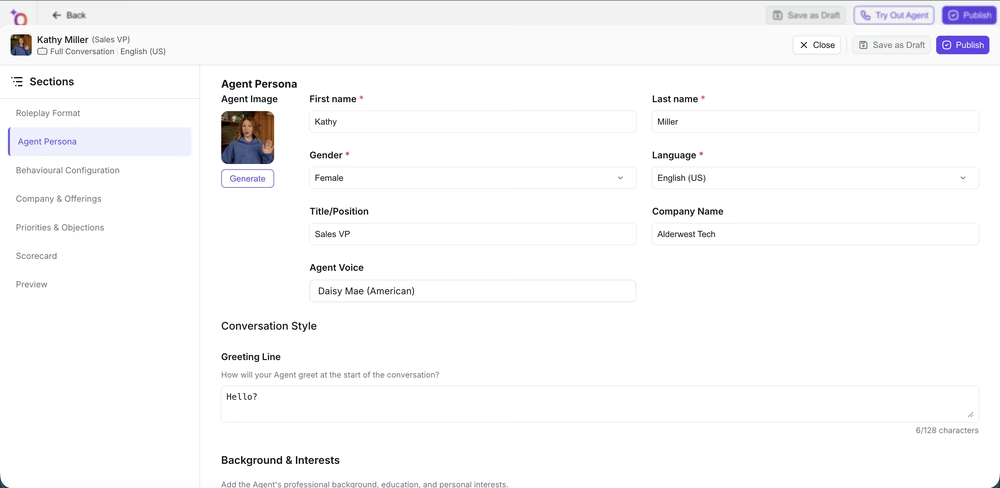 Use the LLM's output to fill in the Agent Persona fields: name, title, company, and background.
Persona template prompt
Copy, paste, and edit the role and industry as needed:
You want to do roleplay with a prospect who is <designation> in <company name/industry name> company. Create a roleplay buyer persona for sales training based on the following points. Make sure the persona is detailed, realistic, and structured.

1. Name of buyer (use a fictional name, not the real one)
2. Gender: Male/Female/Other
3. Designation
4. Company name
5. Bio information: location, age, family status, career background
6. Description: a detailed narrative of the buyer's personality
7. Personality traits: concise list
8. Company structure: where this role fits in the org chart
9. Company product/service description
10. Buyer knowledge as per their role
11. Buyer priorities (1 or 2)
12. Common objections (1 or 2)
13. Buyer opinions (1 or 2)
14. Instruction to the salesperson: provide only brief prospect details and focus on booking another call. Do not reveal the buyer's deeper objections, knowledge, or personality traits in the first meeting. The interaction should feel like a first conversation.
Tips for better prompts
- Add industry context, for example "Airline CRO in Europe" or "SaaS CPO in North America".
- Specify tone, for example "make the persona skeptical and data-driven".
- Request multiple personas, for example "create three personas with different objections".
- Refine the output: if it feels too generic, ask the LLM to "make it more realistic" or "add common objections around budgets".
Summary
A structured prompt lets an LLM generate usable buyer personas in minutes. Paste the response into Outdoo to start practicing with realistic buyer roleplays. This saves time and keeps personas consistent across your team.