
Switching Between AI Roleplay and Revenue Intelligence
Outdoo bundles two apps into one account: AI Roleplay, for agent-based practice and coaching, and Revenue Intelligence, for call recording, deal tracking, and revenue analytics. If your workspace has both enabled, you can move between them without logging out or picking a different URL.
Where the switcher lives
The app switcher is the icon directly below the Outdoo logo, at the top of the left navigation bar. It shows the icon of whichever app you are currently in.
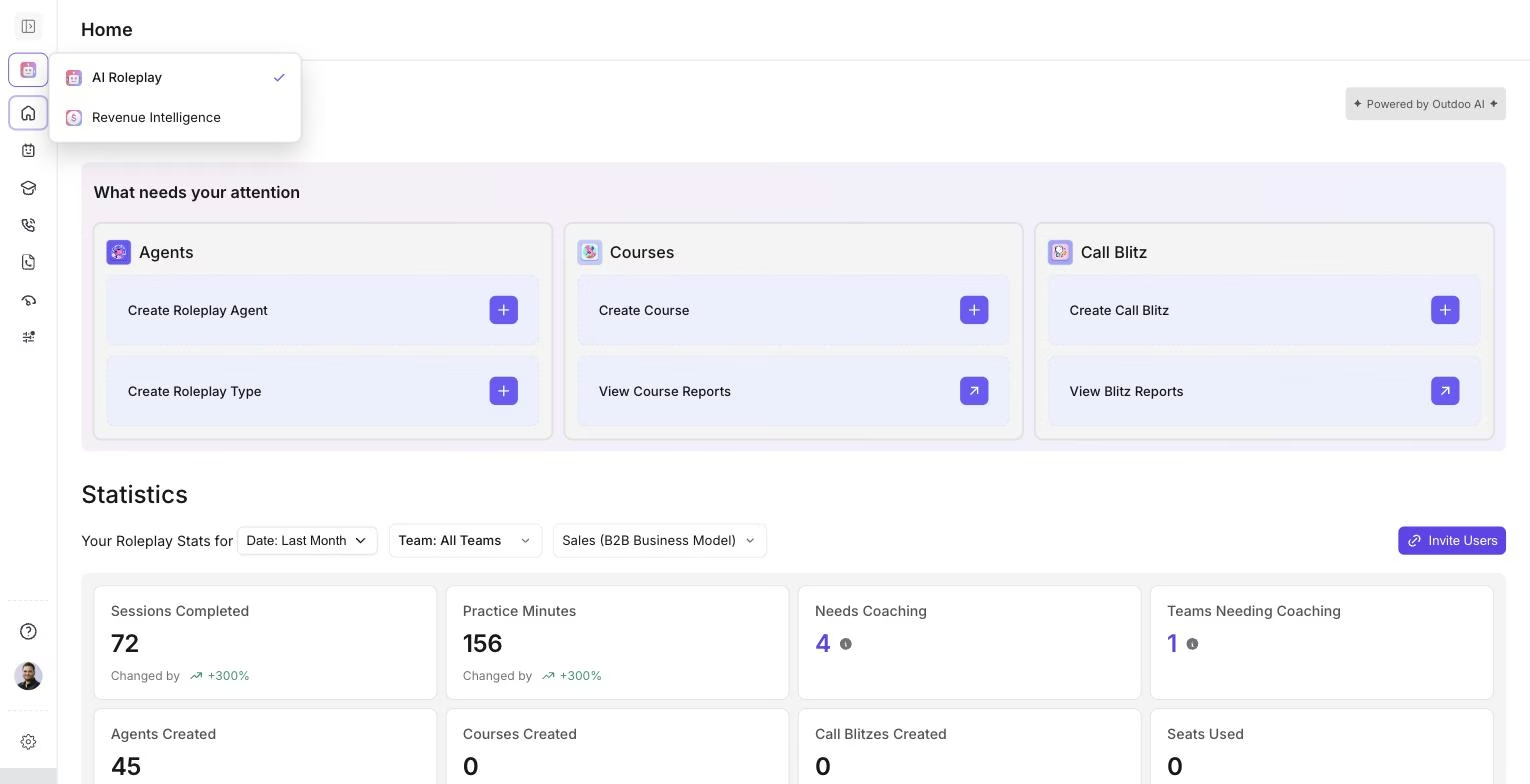
Click the icon below the logo to open the switcher. A checkmark marks the app you're currently in.
How to switch
- Click the app icon below the logo.
- Pick AI Roleplay or Revenue Intelligence from the dropdown.
- The page reloads into that app's Home screen.
The rest of the left navigation changes to match: AI Roleplay shows Agents, Call Blitz, Courses, History, and Performance; Revenue Intelligence shows call recording, deals, and revenue-focused sections instead.
What carries over
Your login and workspace stay the same when you switch. Only the app changes.
If you don't see Revenue Intelligence (or AI Roleplay) in the switcher, your workspace may not have that app enabled. Contact your admin or support@outdoo.ai to add it.